Select menus
Select menus are dropdown components. An action row can hold exactly one select menu. Arcscord supports all five Discord select menu types.
What they look like
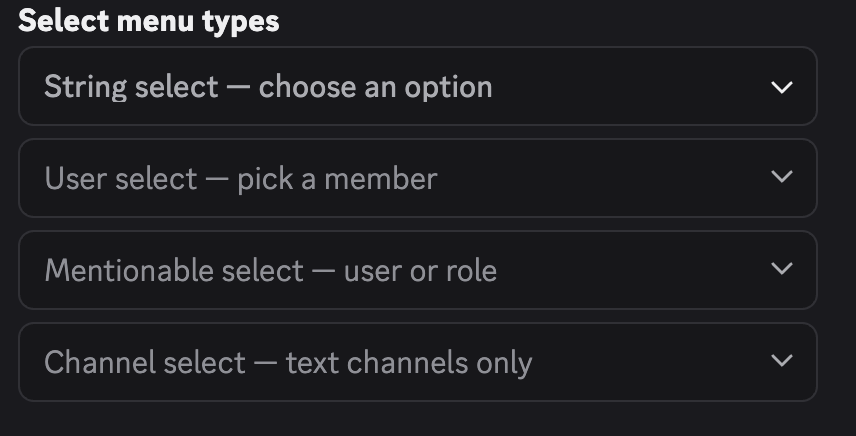
All select menu builder functions (stringSelectMenu, userSelectMenu, etc.) already return an ActionRowData — they wrap the component in an action row automatically. Pass the result directly to components: [...] without wrapping in actionRow().
Common options
These options apply to all select menu types.
| Option | Type | Required | Description |
|---|---|---|---|
customId | string | Yes | Must be set to id(). Max 100 chars. |
placeholder | string | No | Grey text shown when nothing is selected. Max 150 chars. |
minValues | number | No | Minimum number of selections required. Default: 1. |
maxValues | number | No | Maximum number of selections allowed. Default: 1. |
disabled | boolean | No | Prevents interaction. Default: false. |
String select
Use createSelectMenu with ComponentType.StringSelect when you want to pass the option list at build time.
stringSelectMenu() options
| Option | Type | Required | Description |
|---|---|---|---|
options | SelectOption[] | string[] | Yes | The selectable items. See below. |
customId | string | Yes | Custom ID. |
placeholder | string | No | Placeholder text. |
minValues | number | No | Min selections. |
maxValues | number | No | Max selections. |
disabled | boolean | No | Disabled state. |
Each SelectOption object:
| Field | Type | Required | Description |
|---|---|---|---|
label | string | Yes | Text shown in the dropdown. Max 100 chars. |
value | string | Yes | Value received in ctx.values. Max 100 chars. |
description | string | No | Subtext under the label. Max 100 chars. |
emoji | ComponentEmojiResolvable | No | Emoji displayed next to the label. |
default | boolean | No | Pre-selects this option when the menu first renders. |
Shorthand: pass a plain string to use it as both label and value.
When you pass options as variadic build arguments, each arg must be a plain string (the string becomes both label and value):
import { createSelectMenu, stringSelectMenu } from "arcscord";
import { ComponentType } from "discord.js";

export const categoryMenu = createSelectMenu({
  type: ComponentType.StringSelect,
  route: "category_menu",
  build: (id, ...options) => stringSelectMenu({
    customId: id(),
    options,
    placeholder: "Choose a category",
  }),
  run: ctx => ctx.reply(`Selected: ${ctx.values.join(", ")}`),
});

// send it — pass options as plain strings
categoryMenu.build("commands", "events", "components")
For rich options (label, description, emoji), define them directly inside build instead of using variadic args:
export const richCategoryMenu = createSelectMenu({
  type: ComponentType.StringSelect,
  route: "rich_category_menu",
  build: id => stringSelectMenu({
    customId: id(),
    options: [
      { label: "Commands", value: "commands", description: "Slash commands & context menus" },
      { label: "Components", value: "components", description: "Buttons, selects, modals" },
      { label: "Events", value: "events" },
    ],
    placeholder: "Choose a category",
  }),
  run: ctx => ctx.reply(`Selected: ${ctx.values.join(", ")}`),
});

richCategoryMenu.build() // no args needed
ctx.values is string[].
Typed string select
Use createTypedStringMenu when the option set is fixed at compile time. Arcscord infers the value type from the keys, so ctx.values is a typed union array.
Top-level options
| Field | Type | Required | Description |
|---|---|---|---|
values | Record<string, OptionDef | string> | Yes | The fixed option set. Keys become the selectable values. Captured immediately when createTypedStringMenu is called. |
maxValues | number | No | Max selections. When 1, ctx.value is a single string. When > 1, ctx.values is an array. |
minValues | number | No | Min selections. Default: 1. |
Each option definition in values:
| Field | Type | Required | Description |
|---|---|---|---|
label | string | No | Displayed label. Defaults to the key if omitted. |
description | string | No | Subtext. |
emoji | ComponentEmojiResolvable | No | Emoji next to the label. |
default | boolean | No | Pre-selects this option. |
Or pass a plain string as the value — it becomes the label.
build return object
| Field | Type | Required | Description |
|---|---|---|---|
customId | string | Yes | Must be id(). |
placeholder | string | No | Placeholder text. |
disabled | boolean | No | Disabled state. |
optionOverrides | TypedSelectMenuOptionOverrides<typeof values> | No | Presentation overrides keyed by the static option values. |
import { createTypedStringMenu } from "arcscord";

export const moodMenu = createTypedStringMenu({
  route: "mood_menu",
  values: {
    great: { label: "Great 🎉", description: "Feeling awesome" },
    okay:  { label: "Okay 😐" },
    bad:   { label: "Bad 😞", description: "Having a rough day" },
  } as const,  // as const is required for TypeScript to infer the key union
  maxValues: 1,
  build: id => ({
    customId: id(),
    placeholder: "How are you feeling?",
  }),
  run: (ctx) => {
    const mood = ctx.values; // typed as "great" | "okay" | "bad"
    return ctx.reply(`Mood: ${mood}`);
  },
});
as const on the values object is what makes TypeScript narrow the type. Without it, ctx.values falls back to string.
When maxValues is 1, ctx.values is the single selected key (a string). When maxValues > 1, ctx.values is an array of keys.
values must be staticYou must declare values as a static object literal asserted with as const, passed directly to createTypedStringMenu (not inside build). Its keys define both the ctx.values type and the set of values accepted at runtime — a selection outside that set (for example coming from an outdated message whose options no longer match) is rejected before run is called. Building values dynamically (or dropping as const) collapses ctx.values back to string and removes the type safety this helper provides.
Dynamic option presentation & i18next
The keys in values must stay static, but their presentation can vary for each call to build.
Return optionOverrides from build to replace an option's label, description, emoji, or
default state. Overrides are merged with the static definition, so omitted properties keep their
original values.
optionOverrides is keyed by the keys of values. TypeScript rejects undeclared keys and does not
offer a value property: changing presentation can therefore never change ctx.values typing or
the runtime set used to validate interactions. The static object is not mutated, so the same handler
can safely be built for several users or locales.
import { createTypedStringMenu } from "arcscord";

const values = {
  great: { label: "Great", description: "Feeling awesome", emoji: "🎉" },
  okay: { label: "Okay", description: "Doing fine" },
  bad: { label: "Bad", description: "Having a rough day" },
} as const;

type MoodPresentation = {
  placeholder: string;
  great: string;
  greatDescription: string;
  okay: string;
  bad: string;
  defaultMood: "great" | "okay" | "bad";
};

export const localizedMoodMenu = createTypedStringMenu({
  route: "localized_mood",
  values,
  maxValues: 1,
  build: (id, presentation: MoodPresentation) => ({
    customId: id(),
    placeholder: presentation.placeholder,
    optionOverrides: {
      great: {
        label: presentation.great,
        description: presentation.greatDescription,
        emoji: "✨",
        default: presentation.defaultMood === "great",
      },
      okay: {
        label: presentation.okay,
        default: presentation.defaultMood === "okay",
      },
      bad: {
        label: presentation.bad,
        default: presentation.defaultMood === "bad",
      },
    },
  }),
  run: async ctx => ctx.reply(`Mood: ${ctx.values}`),
});
Resolve translations where ctx.t is available, then pass one object to build, just as with a
typed modal:
localizedMoodMenu.build({
  placeholder: ctx.t($ => $.mood.placeholder),
  great: ctx.t($ => $.mood.great.label),
  greatDescription: ctx.t($ => $.mood.great.description),
  okay: ctx.t($ => $.mood.okay.label),
  bad: ctx.t($ => $.mood.bad.label),
  defaultMood: "okay",
})
User select
Lets the user pick one or more server members.
Additional options
| Option | Type | Description |
|---|---|---|
defaultValues | Array<{ id: string; type: "user" }> | Pre-selected users shown when the menu renders. |
import { createSelectMenu, userSelectMenu } from "arcscord";
import { ComponentType } from "discord.js";

export const assignMenu = createSelectMenu({
  type: ComponentType.UserSelect,
  route: "assign_user",
  build: (id) => userSelectMenu({
    customId: id(),
    placeholder: "Assign to…",
    maxValues: 3,
  }),
  run: (ctx) => {
    const names = ctx.values.map(u => u.username).join(", ");
    return ctx.reply(`Assigned to: ${names}`);
  },
});
ctx.values is User[].
Role select
Lets the user pick one or more roles.
Additional options
| Option | Type | Description |
|---|---|---|
defaultValues | Array<{ id: string; type: "role" }> | Pre-selected roles. |
export const roleMenu = createSelectMenu({
  type: ComponentType.RoleSelect,
  route: "role_picker",
  build: (id, placeholder: string) => roleSelectMenu({
    customId: id(),
    placeholder,
  }),
  run: ctx => ctx.reply(`Role: ${ctx.values[0]?.name}`),
});
ctx.values is Role[].
Mentionable select
Lets the user pick users or roles in the same menu.
Additional options
| Option | Type | Description |
|---|---|---|
defaultValues | Array<{ id: string; type: "user" | "role" }> | Pre-selected users or roles. |
export const targetMenu = createSelectMenu({
  type: ComponentType.MentionableSelect,
  route: "target_picker",
  build: (id) => mentionableSelectMenu({ customId: id(), placeholder: "Mention a user or role" }),
  run: (ctx) => {
    const name = ctx.values.map(v => "username" in v ? v.username : v.name).join(", ");
    return ctx.reply(`Target: ${name}`);
  },
});
ctx.values is (User | Role)[].
Channel select
Lets the user pick one or more channels. Optionally filter by channel type.
Additional options
| Option | Type | Description |
|---|---|---|
channelTypes | ChannelType[] | Restrict which channel types appear. |
defaultValues | Array<{ id: string; type: "channel" }> | Pre-selected channels. |
Available channelTypes values:
| Value | Description |
|---|---|
"guildText" | Standard text channel |
"guildVoice" | Voice channel |
"guildCategory" | Category |
"guildAnnouncement" | Announcement channel |
"publicThread" | Public thread |
"privateThread" | Private thread |
"announcementThread" | Thread inside announcement channel |
"guildStageVoice" | Stage channel |
"guildForum" | Forum channel |
"guildMedia" | Media channel |
"dm" | Direct message |
"groupDm" | Group DM |
export const channelMenu = createSelectMenu({
  type: ComponentType.ChannelSelect,
  route: "channel_picker",
  build: (id) => channelSelectMenu({
    customId: id(),
    placeholder: "Pick a channel",
    channelTypes: ["guildText", "guildAnnouncement"], // text-like only
  }),
  run: ctx => ctx.reply(`Channel: #${ctx.values[0]?.id}`),
});
ctx.values is Channel[].
createSelectMenu() handler options
These apply to all select menu handler types.
| Option | Type | Required | Description |
|---|---|---|---|
type | ComponentType | Yes | The menu type (StringSelect, UserSelect, RoleSelect, MentionableSelect, ChannelSelect). |
route | string | Yes | Custom ID pattern, same rules as buttons. |
build | (id, ...args) => ActionRow | Yes | Returns the built select menu wrapped in an action row. |
run | (ctx) => Result | Yes | Interaction handler. ctx.values type depends on the menu type. |
preReply | true | "ephemeral" | No | Defer before middlewares. |
use | ComponentMiddleware[] | No | Middleware chain. |
Route parameters
Select menus support the same {paramName} route pattern as buttons. Pass params as an object to .build() — id() always takes no arguments inside build:
export const ticketAssign = createSelectMenu({
  type: ComponentType.UserSelect,
  route: "ticket/{ticketId}/assign",
  build: id => userSelectMenu({
    customId: id(),
    placeholder: "Assign to…",
  }),
  run: ctx => ctx.reply(`Assigned ticket ${ctx.params.ticketId} to ${ctx.values[0]?.username}`),
});

// sending it
ticketAssign.build({ ticketId: "42" })