Modal
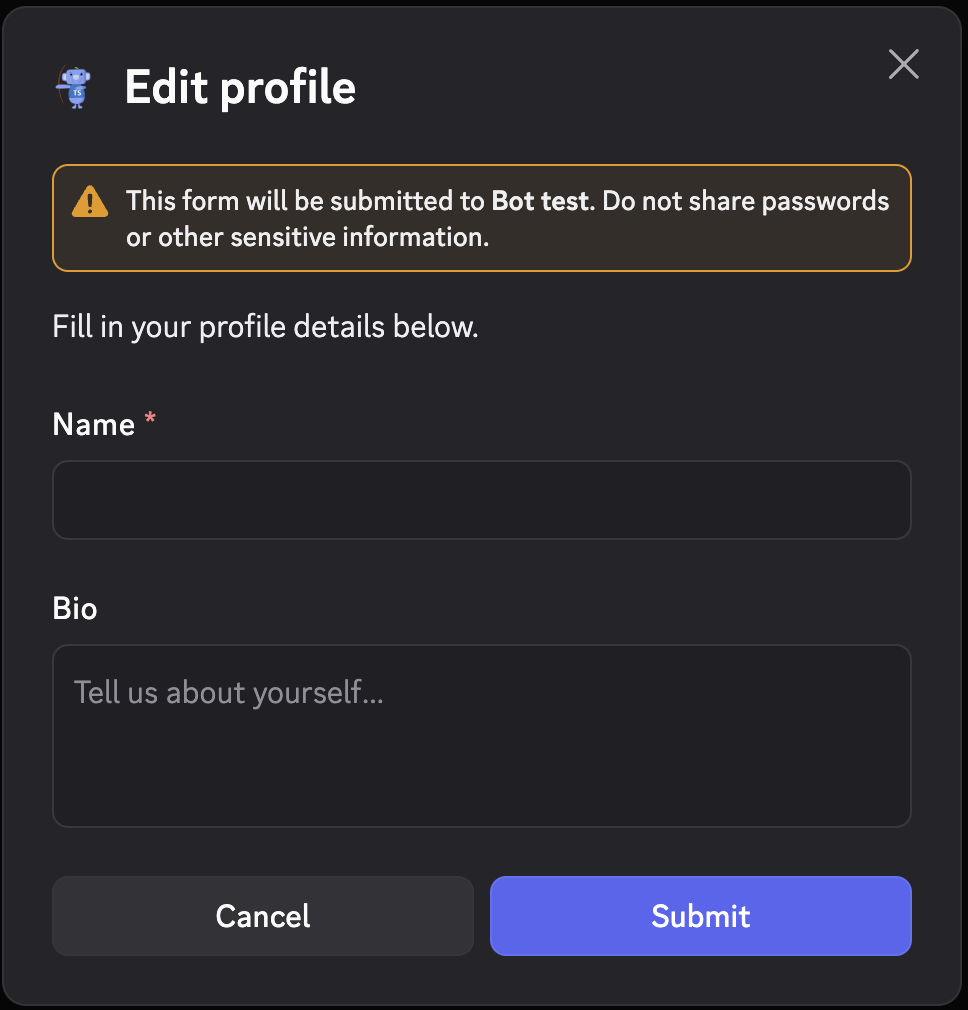
Modals are pop-up forms that Discord shows when triggered by a button or command. Arcscord provides typed field helpers so ctx.values has the correct type for each field automatically.
Basic modal
import { buildModal, createModal, modalTextInput } from "arcscord";

export const profileModal = createModal({
  route: "modal/profile",
  fields: {
    name: modalTextInput({ label: "Name", required: true, maxLength: 80 }),
    bio: modalTextInput({ label: "Bio", style: "paragraph", required: false }),
  },
  build: (id, fields) => buildModal({
    title: "Edit profile",
    customId: id(),
    components: [
      "Fill in your profile details below.", // equivalent to text()
      fields.name.label(),
      fields.bio.label(),
    ],
  }),
  run: (ctx) => {
    const name: string = ctx.values.name;
    const bio: string | undefined = ctx.values.bio;
    return ctx.reply(`Name: ${name}, bio: ${bio ?? "—"}`);
  },
});
Trigger it from a command or button:
ctx.showModal(profileModal.build());
Text input
modalTextInput creates a standard text field.
modalTextInput({
  label: "Title",
  style: "short",         // "short" (default) or "paragraph" (multi-line)
  required: true,
  placeholder: "Enter a title…",
  minLength: 3,
  maxLength: 100,
})
ctx.values.fieldName is string when required, string | undefined when optional.
Select fields inside a modal
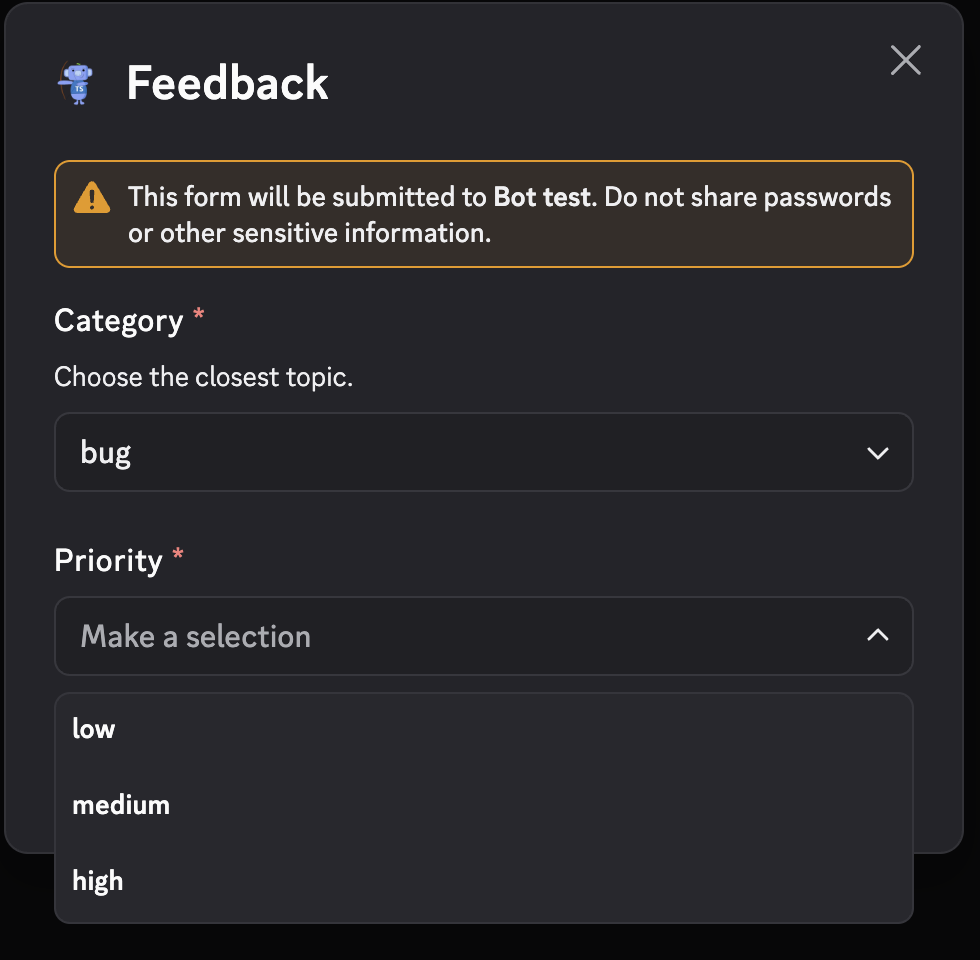
Discord's interactive modal components let you embed select menus directly in modals.
String select
import { buildModal, createModal, modalStringSelect } from "arcscord";

export const feedbackModal = createModal({
  route: "modal/feedback",
  fields: {
    category: modalStringSelect({
      label: "Category",
      description: "Choose the closest topic.",
      options: ["bug", "idea", "question"],
      required: true,
    }),
    priority: modalStringSelect({
      label: "Priority",
      options: ["low", "medium", "high"],
      required: true,
    }),
  },
  build: (id, fields) => buildModal({
    title: "Feedback",
    customId: id(),
    components: [fields.category.label(), fields.priority.label()],
  }),
  run: (ctx) => {
    const category: "bug" | "idea" | "question" = ctx.values.category;
    const priority: "low" | "medium" | "high" = ctx.values.priority;
    return ctx.reply(`${category} — ${priority}`);
  },
});
ctx.values.category is typed as the union of the option values.
Radio group
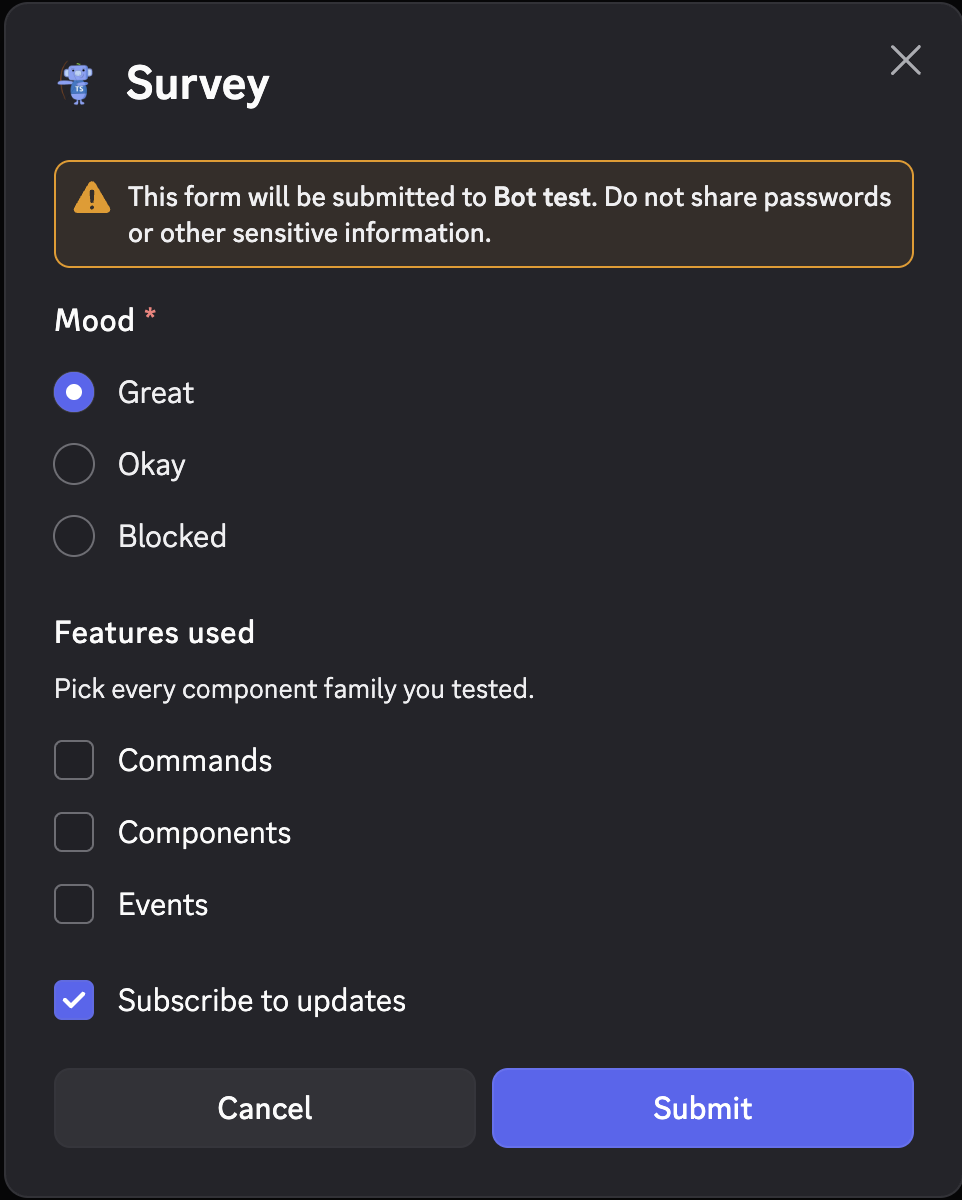
Use modalRadioGroup for single-choice selection displayed as radio buttons:
import { modalRadioGroup } from "arcscord";

fields: {
  mood: modalRadioGroup({
    label: "Mood",
    required: true,
    options: [
      { label: "Great", value: "great" },
      { label: "Okay", value: "okay" },
      { label: "Blocked", value: "blocked" },
    ],
  }),
}
ctx.values.mood is typed as "great" | "okay" | "blocked".
Checkbox group
modalCheckboxGroup allows multiple selections:
import { modalCheckboxGroup } from "arcscord";

fields: {
  features: modalCheckboxGroup({
    label: "Features used",
    description: "Pick every component family you tested.",
    required: false,
    minValues: 0,
    maxValues: 3,
    options: [
      { label: "Commands", value: "commands" },
      { label: "Components", value: "components" },
      { label: "Events", value: "events" },
    ],
  }),
}
ctx.values.features is typed as Array<"commands" | "components" | "events">.
Single checkbox
modalCheckbox renders a single on/off toggle:
import { modalCheckbox } from "arcscord";

fields: {
  subscribe: modalCheckbox({
    label: "Subscribe to updates",
    default: false,
  }),
}
ctx.values.subscribe is boolean.
Combined example — survey modal
import {
  buildModal, createModal,
  modalCheckbox, modalCheckboxGroup, modalRadioGroup,
} from "arcscord";

export const surveyModal = createModal({
  route: "modal/survey",
  fields: {
    mood: modalRadioGroup({
      label: "Mood",
      required: true,
      options: [
        { label: "Great", value: "great" },
        { label: "Okay", value: "okay" },
        { label: "Blocked", value: "blocked" },
      ],
    }),
    features: modalCheckboxGroup({
      label: "Features used",
      description: "Pick every component family you tested.",
      required: false,
      minValues: 0,
      maxValues: 3,
      options: [
        { label: "Commands", value: "commands" },
        { label: "Components", value: "components" },
        { label: "Events", value: "events" },
      ],
    }),
    subscribe: modalCheckbox({ label: "Subscribe to updates", default: true }),
  },
  build: (id, fields) => buildModal({
    title: "Survey",
    customId: id(),
    components: [fields.mood.label(), fields.features.label(), fields.subscribe.label()],
  }),
  run: (ctx) => {
    const mood: "great" | "okay" | "blocked" = ctx.values.mood;
    const features: Array<"commands" | "components" | "events"> = ctx.values.features;
    return ctx.reply(`Mood: ${mood}, features: ${features.join(", ")}, subscribe: ${ctx.values.subscribe}`);
  },
});
Entity select fields
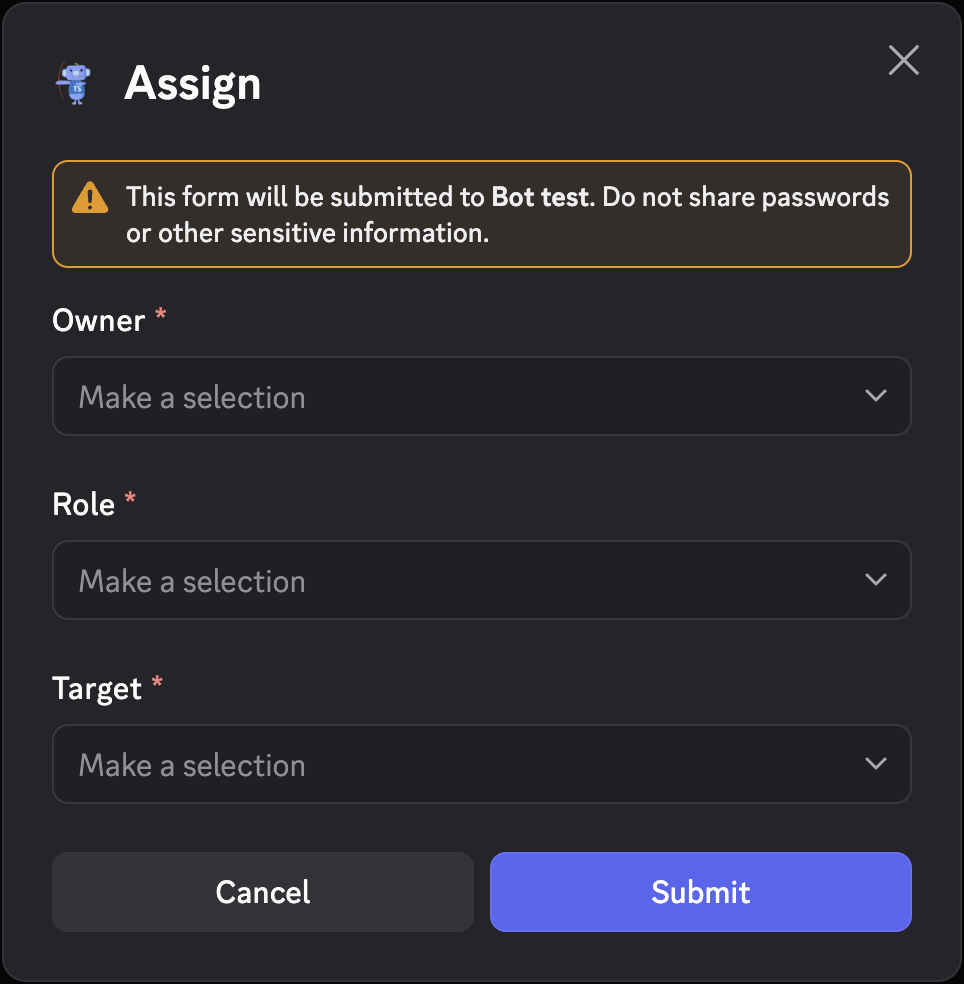
Modals can include user, role, mentionable, and channel selects:
import {
  buildModal, createModal,
  modalMentionableSelect, modalRoleSelect, modalUserSelect,
} from "arcscord";

export const assignModal = createModal({
  route: "modal/assign",
  fields: {
    owner: modalUserSelect({ label: "Owner", required: true }),
    role: modalRoleSelect({ label: "Role", required: true }),
    target: modalMentionableSelect({ label: "Target", required: true }),
  },
  build: (id, fields) => buildModal({
    title: "Assign",
    customId: id(),
    components: [fields.owner.label(), fields.role.label(), fields.target.label()],
  }),
  run: (ctx) => {
    return ctx.reply(
      `Owner: ${ctx.values.owner.username}, role: ${ctx.values.role.name}`,
    );
  },
});
| Helper | ctx.values type |
|---|---|
modalUserSelect | User / User | undefined |
modalRoleSelect | Role / Role | undefined |
modalMentionableSelect | User | Role |
modalChannelSelect | Channel |
modalUserSelect with maxValues > 1 produces User[].
File upload
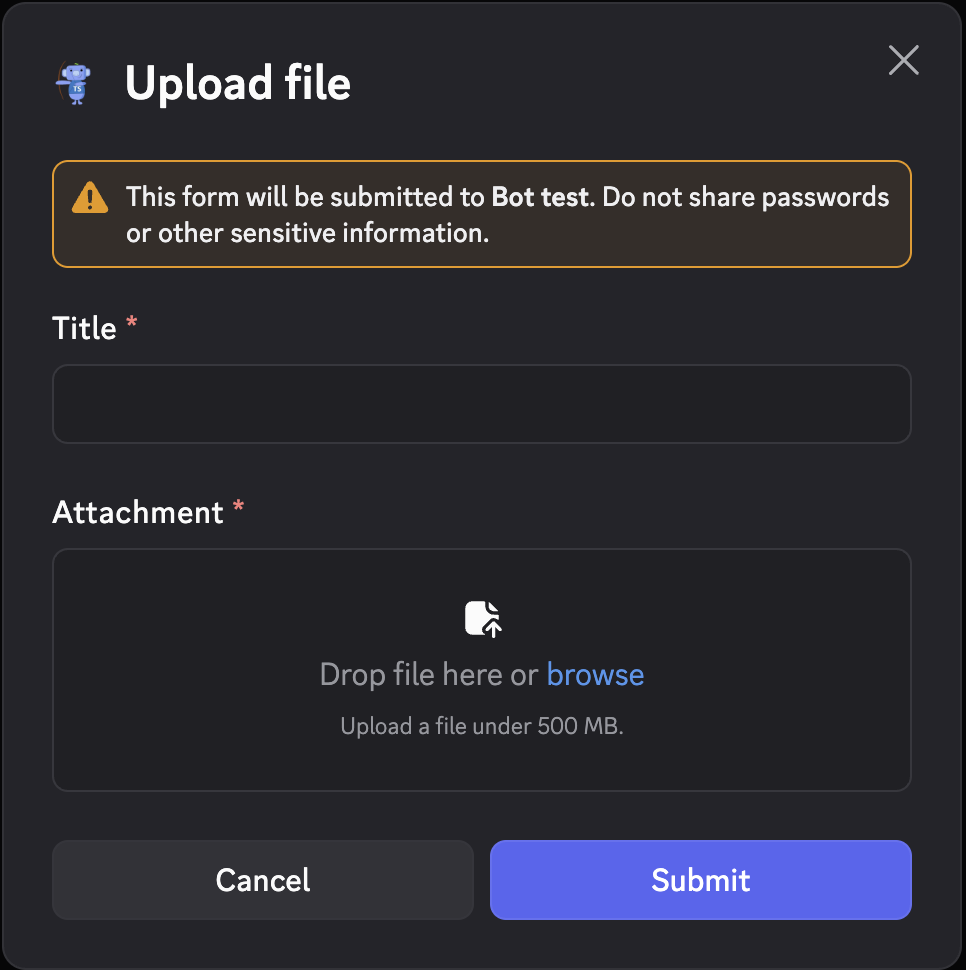
modalFileUpload lets users attach a file:
import { buildModal, createModal, modalFileUpload, modalTextInput } from "arcscord";

export const uploadModal = createModal({
  route: "modal/upload",
  fields: {
    title: modalTextInput({ label: "Title", required: true }),
    attachment: modalFileUpload({
      label: "Attachment",
      required: true,
      minValues: 1,
      maxValues: 1,
    }),
  },
  build: (id, fields) => buildModal({
    title: "Upload file",
    customId: id(),
    components: [fields.title.label(), fields.attachment.label()],
  }),
  run: (ctx) => {
    return ctx.reply(
      `Title: ${ctx.values.title}, file: ${ctx.values.attachment.name}`,
    );
  },
});
ctx.values.attachment is an Attachment object with .name, .url, .size, etc.
Adding text between fields
Use text() to add explanatory content between form fields:
import { text } from "arcscord";

build: (id, fields) => buildModal({
  title: "Feedback",
  customId: id(),
  components: [
    text("Use the fields below to send structured feedback."),
    fields.category.label(),
    fields.message.label(),
  ],
})
Dynamic labels & i18next
Field labels, descriptions, placeholders and option labels are fixed when the field is created, so
they're static by default. To localize them — or make them vary per user — pass overrides to
.label(overrides) inside build. Only the displayed text is overridable: option values stay fixed,
so ctx.values typing and validation are unaffected. Calling .label() with no argument keeps the
static text, so existing modals need no changes.
build runs on every .build(...) call, so it's the right place to inject dynamic text. Pass the
values through the modal's build arguments — either positionally, or as a single object for
readability:
export const profileModal = createModal({
  route: "modal/profile",
  fields: {
    name: modalTextInput({ label: "Name", required: true }),
    mood: modalRadioGroup({
      label: "Mood",
      options: [
        { label: "Great", value: "great" },
        { label: "Okay", value: "okay" },
      ],
    }),
  },
  build: (id, fields, t: { title: string; name: string; mood: string; great: string }) =>
    buildModal({
      title: t.title,
      customId: id(),
      components: [
        fields.name.label({ label: t.name }),
        fields.mood.label({
          label: t.mood,
          // keyed by the option value — only declared values are accepted
          options: { great: { label: t.great } },
        }),
      ],
    }),
  run: ctx => ctx.reply(`${ctx.values.name} / ${ctx.values.mood}`),
});
Resolve the translations where you have access to ctx.t (a command or component run) and pass them
to .build:
ctx.showModal(profileModal.build({
  title: ctx.t($ => $.profile.title),
  name: ctx.t($ => $.profile.name),
  mood: ctx.t($ => $.profile.mood),
  great: ctx.t($ => $.profile.mood_great),
}));
Each field family accepts the overrides that make sense for it:
| Field | Overridable text |
|---|---|
modalTextInput | label, description, placeholder, value |
modalStringSelect | label, description, placeholder, per-option label / description |
modalRadioGroup / modalCheckboxGroup | label, description, per-option label / description |
| user / role / mentionable / channel selects | label, description, placeholder |
modalFileUpload / modalCheckbox | label, description |