Components v2
Components v2 is Discord's layout-first message format. A v2 message is built entirely from layout and media components instead of content + embeds. Arcscord sets the required IS_COMPONENTS_V2 flag automatically.
The examples in this guide import the helpers from arcscord, which re-exports the complete Components V2 API. Every valid nesting point accepts Discord.js component data, official builders, and raw discord-api-types component objects.
Arcscord and standalone usage
In an Arcscord bot, import the helpers directly from the framework. You do not need to install @arcscord/components separately:
import { actionRow, container, text, v2Message } from "arcscord";
The same API also works without the Arcscord framework. Install the standalone package alongside Discord.js and change only the import source:
pnpm add @arcscord/components discord.js
import { ButtonBuilder, ButtonStyle } from "discord.js";
import { actionRow, v2Message } from "@arcscord/components";

await interaction.reply(v2Message(
  "Standalone Components V2",
  actionRow(
    new ButtonBuilder()
      .setCustomId("confirm")
      .setLabel("Confirm")
      .setStyle(ButtonStyle.Primary),
  ),
));
Both import paths produce the same Discord.js-compatible payloads. The standalone package depends only on discord-api-types at runtime and uses discord.js as a peer dependency.
Validation errors
Every Components V2 helper serializes, normalizes, and validates its result before returning it, including nested components. You can process external data explicitly with validateTextDisplay, validateActionRow, validateSection, validateContainer, validateMessageComponent, or validateV2Message; successful calls return newly constructed Discord.js camelCase data.
Invalid direct calls throw MessageComponentValidationError, which exposes the failed rule and exact component path, whether the helper is imported from @arcscord/components or arcscord. If that error is thrown by a command, component, event, or middleware, Arcscord converts the execution defect into an ArcscordError with code MESSAGE_COMPONENT_VALIDATION_FAILED and retains the validation error as cause. Call normalizeArcscordError(error) for the same conversion outside the execution pipeline.
An unrecognized discriminator uses the neutral unexpected-component-type rule. A recognized Discord component used at an invalid nesting location uses component-placement; neither rule guesses whether the value came from a typo or a newer API.
At message level, validation rejects incompatible legacy body fields, missing IS_COMPONENTS_V2, duplicate non-zero component IDs, duplicate interactive custom IDs, and payloads containing more than 40 components across the full nested tree.
v2Message()
Entry point for a v2 message. Wraps layout components and optional message-level options.
import { v2Message } from "arcscord";

ctx.reply(v2Message(
  "Hello from Components v2!", // plain string — equivalent to text()
));
Message-level options
Pass an options object as the first argument (before layout children) to set message-level flags:
import { MessageFlags } from "discord.js";

ctx.reply(v2Message(
  { files: [{ attachment: buffer, name: "output.txt" }], flags: MessageFlags.Ephemeral },
  "See the attached file.",
))
| Option | Type | Description |
|---|---|---|
files | AttachmentData[] | File attachments. Reference them in file() via attachment://filename. |
flags | MessageFlags | Message flags. Use MessageFlags.Ephemeral to make the message visible only to the user who triggered it. IS_COMPONENTS_V2 is always added automatically. |
tts | boolean | Text-to-speech. |
allowedMentions | AllowedMentions | Control which mentions trigger notifications. |
Migrating an existing message
Discord requires legacy fields to be explicitly cleared when an edit enables Components V2. Supply at least one reset value in the options object; v2Message() returns a typed MessageV2MigrationReplyOptions payload:
await message.edit(v2Message(
  { content: null, embeds: [], stickers: [] },
  "Replacement Components V2 content",
));
Non-empty legacy fields are rejected by the runtime validator. Raw REST payloads may also use an empty sticker_ids array.
Allowed top-level children
v2Message() accepts these component types at the top level. container() accepts the same list except another container:
| Type | Description |
|---|---|
string / text() | Text display block. A plain string is always equivalent to text(). |
container() | Styled group of components |
section() | Text + accessory side by side |
separator() | Vertical spacing / divider |
mediaGallery() | Image grid |
file() | Uploaded file display |
actionRow(button1, button2, ...) | Row of 1–5 buttons |
actionRow(selectMenu) | Row containing exactly one string, user, role, mentionable, or channel select |
Existing ActionRowData / ActionRowBuilder | A complete Discord.js action row, including rows returned by Arcscord's select helpers |
text(content, options?)
Renders a block of Markdown text. A plain string is accepted everywhere text() is — they are fully equivalent.
text("## Title\nBody paragraph with **bold** and `code`.")
"## Title\nBody paragraph with **bold** and `code`." // same result
| Option | Type | Required | Description |
|---|---|---|---|
content | string | Yes | Markdown content. Supports Discord's Markdown subset. |
id | number | No | Internal component ID. Only needed when targeting a specific component in a later edit. |
separator(options?)
Adds vertical space between components. Can optionally render a visible horizontal line.
separator({ divider: true, spacing: "large" })
separator({ spacing: "small" })
separator() // default: no divider, small spacing
| Option | Type | Default | Description |
|---|---|---|---|
divider | boolean | false | Render a visible horizontal rule. |
spacing | "small" | "large" | "small" | Vertical gap size. |
id | number | — | Internal component ID. |
section(options?, ...content, accessory)
Places text content on the left and one accessory (a thumbnail or a button) on the right.
import { section, accessory, thumbnail } from "arcscord";

section(
  "Text content goes here.",
  "A second paragraph.",
  accessory(thumbnail({ media: { url: "https://example.com/img.png" } })),
)
With explicit options:
section(
  { id: 1 },
  "Support ticket",
  "Click the button to open a ticket.",
  accessory(openButton.build()),
)
Section options (first argument, optional)
| Option | Type | Description |
|---|---|---|
id | number | Internal component ID. |
Content arguments
Pass one to three text items before the accessory — strings are automatically wrapped in text().
Accessory (last argument, required)
Must be accessory(thumbnail(...)) or accessory(button(...)). Only one accessory per section.
accessory(component)
Wraps a thumbnail or button to mark it as a section accessory.
accessory(thumbnail({ media: { url: "..." }, description: "Alt text" }))
accessory(myButton.build())
| Accepted value | Description |
|---|---|
thumbnail(...) | An image displayed to the right of the section text. |
button(...) | An interactive button displayed to the right. |
thumbnail(options)
An image component used exclusively as a section accessory.
thumbnail({
  media: { url: "https://cdn.discordapp.com/embed/avatars/0.png" },
  description: "Default avatar",
  spoiler: false,
})
| Option | Type | Required | Description |
|---|---|---|---|
media | { url: string } | Yes | URL of the image. Can be an attachment:// URL or an external URL. |
description | string | No | Alt text for accessibility. Max 1024 chars. |
spoiler | boolean | No | Blurs the image until clicked. Default: false. |
id | number | No | Internal component ID. |
container(options?, ...children)
Groups components into a visual box with an optional coloured left border.
import { container } from "arcscord";

container(
  { accentColor: 0x5865F2 },
  text("Inside the container."),
  separator({ divider: true }),
  actionRow(myButton.build()),
)
Container options (first argument, optional)
| Option | Type | Description |
|---|---|---|
accentColor | number | null | RGB colour for the left border accent, as a decimal integer (e.g. 0x5865F2). null removes the accent. |
spoiler | boolean | Blurs all content inside the container until clicked. Default: false. |
id | number | Internal component ID. |
Allowed children
| Type | Notes |
|---|---|
string / text() | Rendered as a text display block |
section() | Text + accessory |
separator() | Spacing / divider |
mediaGallery() | Image grid |
file() | Uploaded file |
actionRow() | One to five buttons or exactly one select menu |
section() and mediaGallery() cannot be nested inside each other inside a container.
container() constructs a new container and does not accept a complete ContainerBuilder as its sole argument. Pass a complete builder directly to v2Message(), or call validateContainer(builder) when canonical container data is needed separately.
mediaGallery(options)
Displays a grid of images (1–10 items).
import { mediaGallery } from "arcscord";

mediaGallery({
  items: [
    { media: { url: "https://cdn.discordapp.com/embed/avatars/0.png" }, description: "Image 1" },
    { media: { url: "https://cdn.discordapp.com/embed/avatars/1.png" }, description: "Image 2", spoiler: true },
  ],
})
| Option | Type | Required | Description |
|---|---|---|---|
items | MediaGalleryItem[] | Yes | 1 to 10 images. |
id | number | No | Internal component ID. |
Each MediaGalleryItem:
| Field | Type | Required | Description |
|---|---|---|---|
media | { url: string } | Yes | Image URL. External URLs or attachment:// references. |
description | string | No | Alt text. Max 1024 chars. |
spoiler | boolean | No | Blurs the image. Default: false. |
file(options)
Renders a file that was uploaded with the message.
import { file } from "arcscord";
import { Buffer } from "node:buffer";

ctx.reply(v2Message(
  { files: [{ attachment: Buffer.from("hello\n"), name: "output.txt" }] },
  file({ file: { url: "attachment://output.txt" } }),
))
| Option | Type | Required | Description |
|---|---|---|---|
file | { url: string } | Yes | Must be { url: "attachment://filename" } referencing a file uploaded in the message options. |
spoiler | boolean | No | Blurs the file preview. Default: false. |
id | number | No | Internal component ID. |
actionRow(...components)
Creates a Discord message action row. It accepts either 1–5 buttons, or exactly one select menu. The select may be a string, user, role, mentionable, or channel select.
import { actionRow } from "arcscord";

actionRow(confirmButton.build(), cancelButton.build())
Official Discord.js builders, Discord.js component data, and raw discord-api-types objects are accepted:
import { actionRow, v2Message } from "arcscord";
import { StringSelectMenuBuilder } from "discord.js";

ctx.reply(v2Message(
  "Pick a value",
  actionRow(
    new StringSelectMenuBuilder()
      .setCustomId("choice")
      .addOptions({ label: "A", value: "a" }, { label: "B", value: "b" }),
  ),
))
Arcscord's stringSelectMenu(), userSelectMenu(), and related helpers already return a complete ActionRowData. Pass those rows directly to v2Message() or container(); use actionRow(selectBuilder) when you have the select component itself.
Nesting rules
| Parent | Allowed children |
|---|---|
v2Message() / container() | string / text(), section(), separator(), mediaGallery(), file(), and message action rows |
section() | Text strings / text() + exactly one accessory() |
accessory() | thumbnail() or a single button() |
actionRow() | 1–5 buttons, or exactly one string/user/role/mentionable/channel select |
Examples
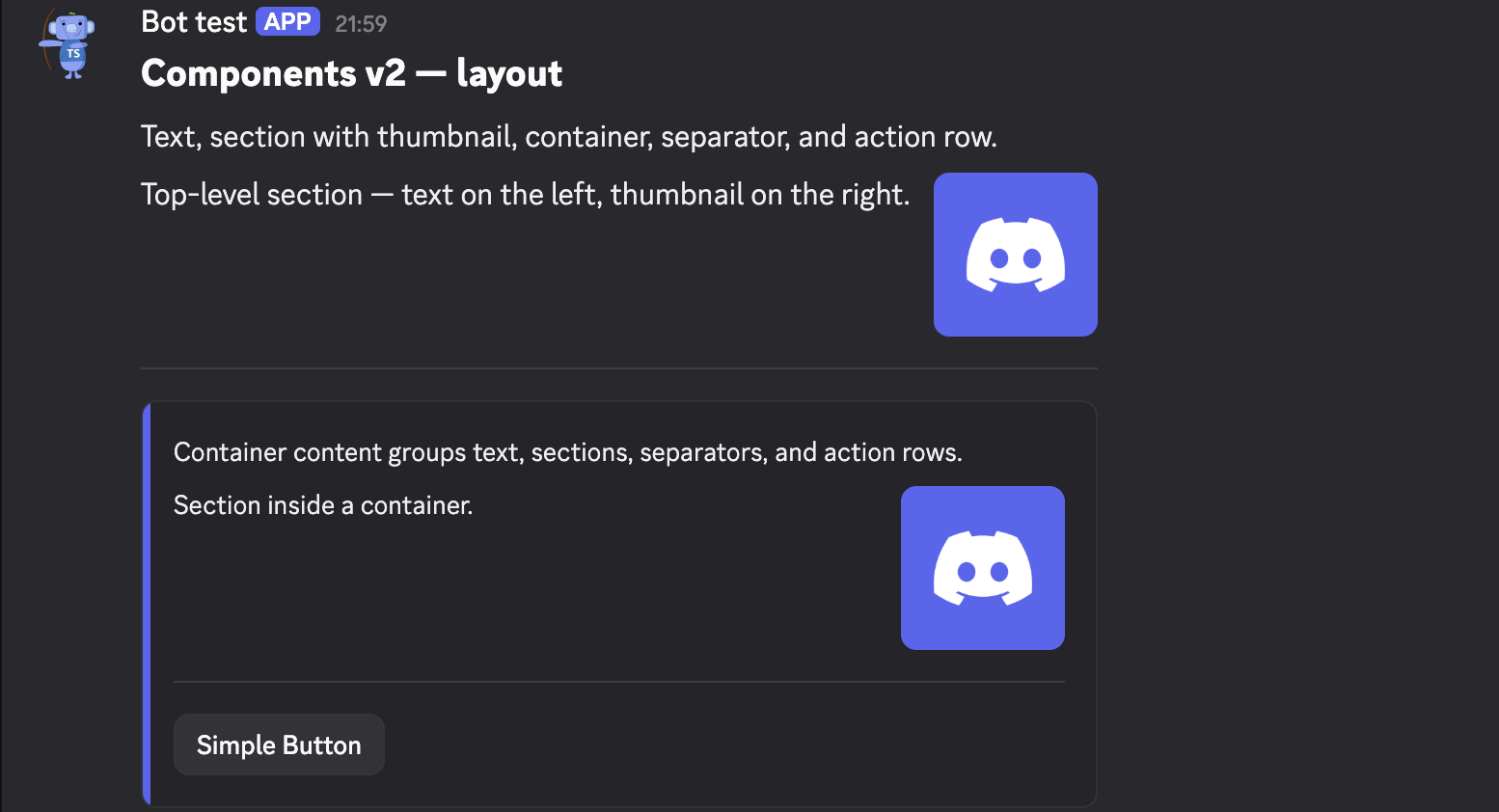
Layout — text, section, container, separator
ctx.reply(
  v2Message(
    text("## Components v2 — layout\nText, section with thumbnail, container, separator, and action row."),
    section(
      "Top-level section — text on the left, thumbnail on the right.",
      accessory(thumbnail({
        media: { url: "https://cdn.discordapp.com/embed/avatars/0.png" },
        description: "Default avatar",
      })),
    ),
    separator({ divider: true, spacing: "large" }),
    container(
      { accentColor: 0x5865F2 },
      "Container content groups text, sections, separators, and action rows.",
      section(
        "Section inside a container.",
        accessory(thumbnail({
          media: { url: "https://cdn.discordapp.com/embed/avatars/0.png" },
          description: "Avatar",
        })),
      ),
      separator({ divider: true, spacing: "large" }),
      actionRow(simpleButton.build()),
    ),
  ),
)
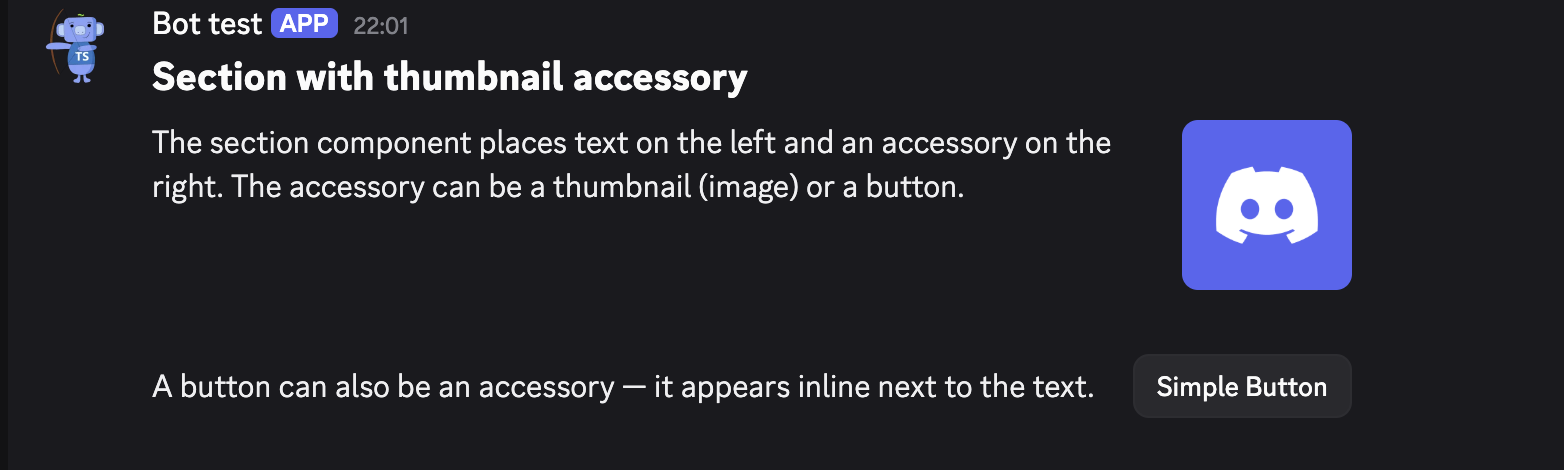
Section — thumbnail and button as accessory
ctx.reply(
  v2Message(
    text("## Section with thumbnail accessory"),
    section(
      { id: 1 },
      "The section component places text on the left and an accessory on the right. The accessory can be a thumbnail (image) or a button.",
      accessory(thumbnail({
        media: { url: "https://cdn.discordapp.com/embed/avatars/0.png" },
        description: "Thumbnail accessory",
      })),
    ),
    separator({ divider: false, spacing: "large" }),
    section(
      { id: 2 },
      "A button can also be an accessory — it appears inline next to the text.",
      accessory(simpleButton.build()),
    ),
  ),
)
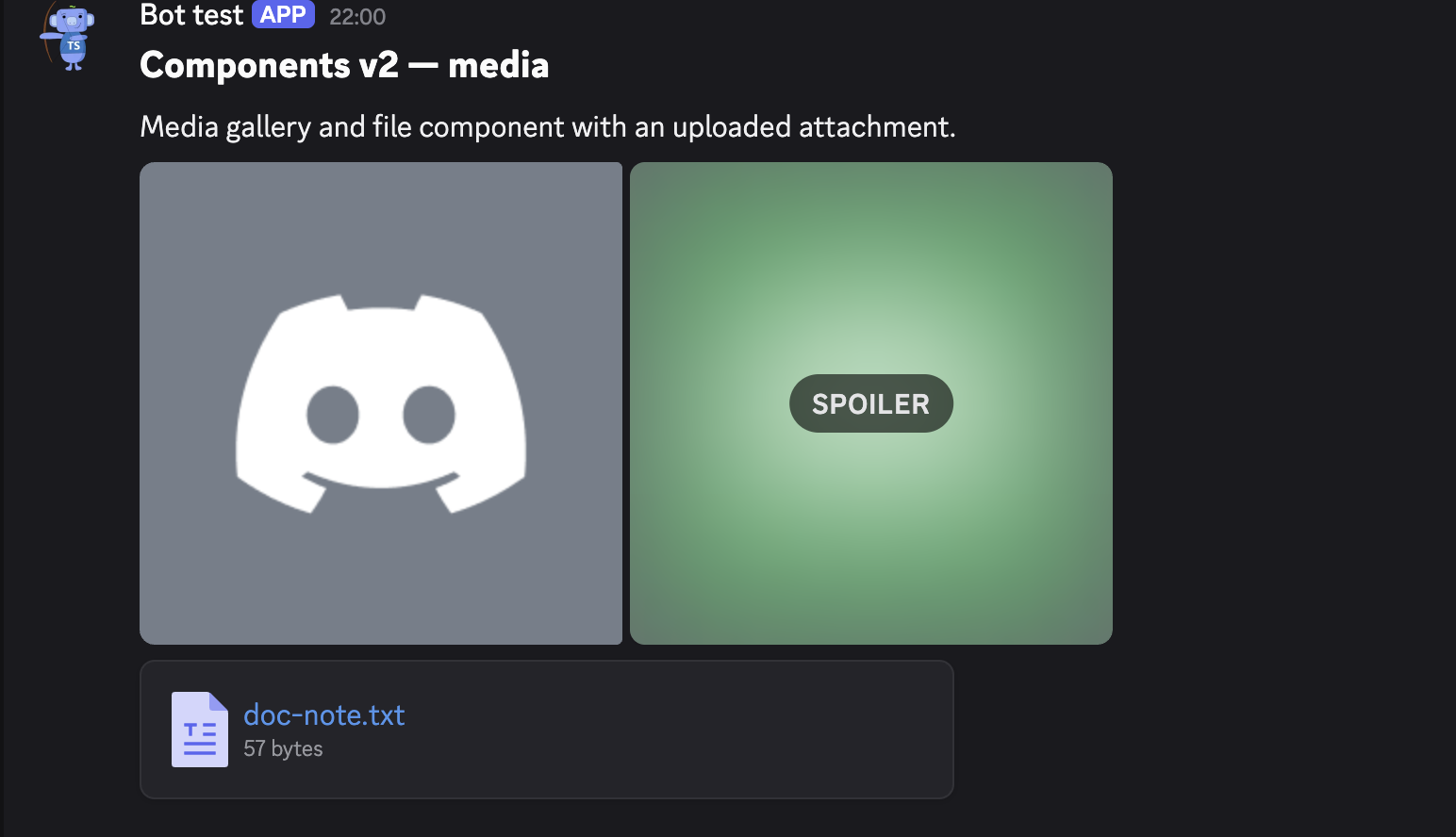
Media — gallery and file
ctx.reply(v2Message(
  {
    files: [{
      attachment: Buffer.from("This file is rendered by a Components v2 File component.\n"),
      name: "doc-note.txt",
    }],
  },
  text("## Components v2 — media\nMedia gallery and file component with an uploaded attachment."),
  mediaGallery({
    items: [
      { media: { url: "https://cdn.discordapp.com/embed/avatars/1.png" }, description: "Gallery image 1" },
      { media: { url: "https://cdn.discordapp.com/embed/avatars/2.png" }, description: "Gallery image 2 (spoiler)", spoiler: true },
    ],
  }),
  file({ file: { url: "attachment://doc-note.txt" } }),
))
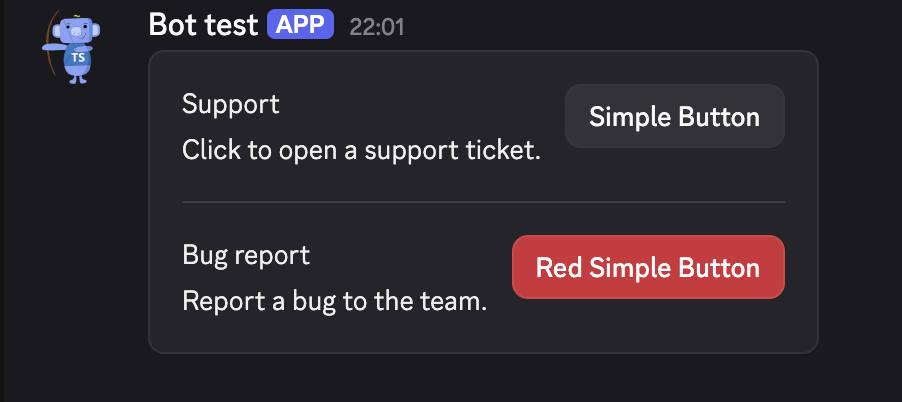
Practical — support panel
ctx.reply(
  v2Message(
    container(
      section(
        "Support",
        "Click to open a support ticket.",
        accessory(openTicketButton.build()),
      ),
      separator({ spacing: "large" }),
      section(
        "Bug report",
        "Report a bug to the team.",
        accessory(bugButton.build()),
      ),
    ),
  ),
)
Full example
import { Buffer } from "node:buffer";
import {
  accessory, actionRow, container, file,
  mediaGallery, section, separator, text, thumbnail, v2Message,
} from "arcscord";

ctx.reply(v2Message(
  {
    files: [{ attachment: Buffer.from("Report data\n"), name: "report.txt" }],
  },
  text("## Weekly report"),
  section(
    "Stats for this week are ready.",
    accessory(thumbnail({
      media: { url: "https://cdn.discordapp.com/embed/avatars/0.png" },
      description: "Report icon",
    })),
  ),
  separator({ divider: true, spacing: "large" }),
  container(
    { accentColor: 0x57F287 },
    text("**Charts**"),
    mediaGallery({
      items: [
        { media: { url: "https://cdn.discordapp.com/embed/avatars/1.png" }, description: "Chart A" },
        { media: { url: "https://cdn.discordapp.com/embed/avatars/2.png" }, description: "Chart B" },
      ],
    }),
    separator({ divider: false, spacing: "small" }),
    text("**Raw data**"),
    file({ file: { url: "attachment://report.txt" } }),
    separator({ divider: true }),
    actionRow(downloadButton.build()),
  ),
))